
Check your daily electricity usage through your utility account, smart meter, energy monitor, or a simple meter-reading formula.
Knowing how can i check my daily electricity usage can help you find waste, lower your bill, and plan energy use with confidence. I have found that the best method depends on your home, utility company, and meter type. This guide explains each option in plain language, including smart meter data, manual readings, energy apps, appliance estimates, common mistakes, and practical ways to save.
What daily electricity usage means
Your daily electricity usage is the amount of energy your home consumes in one day. Electric companies measure this energy in kilowatt-hours, written as kWh.
A kilowatt-hour is not the same as a kilowatt. A kilowatt measures power at one moment. A kilowatt-hour measures energy used over time.
For example:
- A 1,000-watt space heater running for one hour uses 1 kWh.
- A 100-watt light bulb running for 10 hours uses 1 kWh.
- A 2,000-watt appliance running for 30 minutes uses 1 kWh.
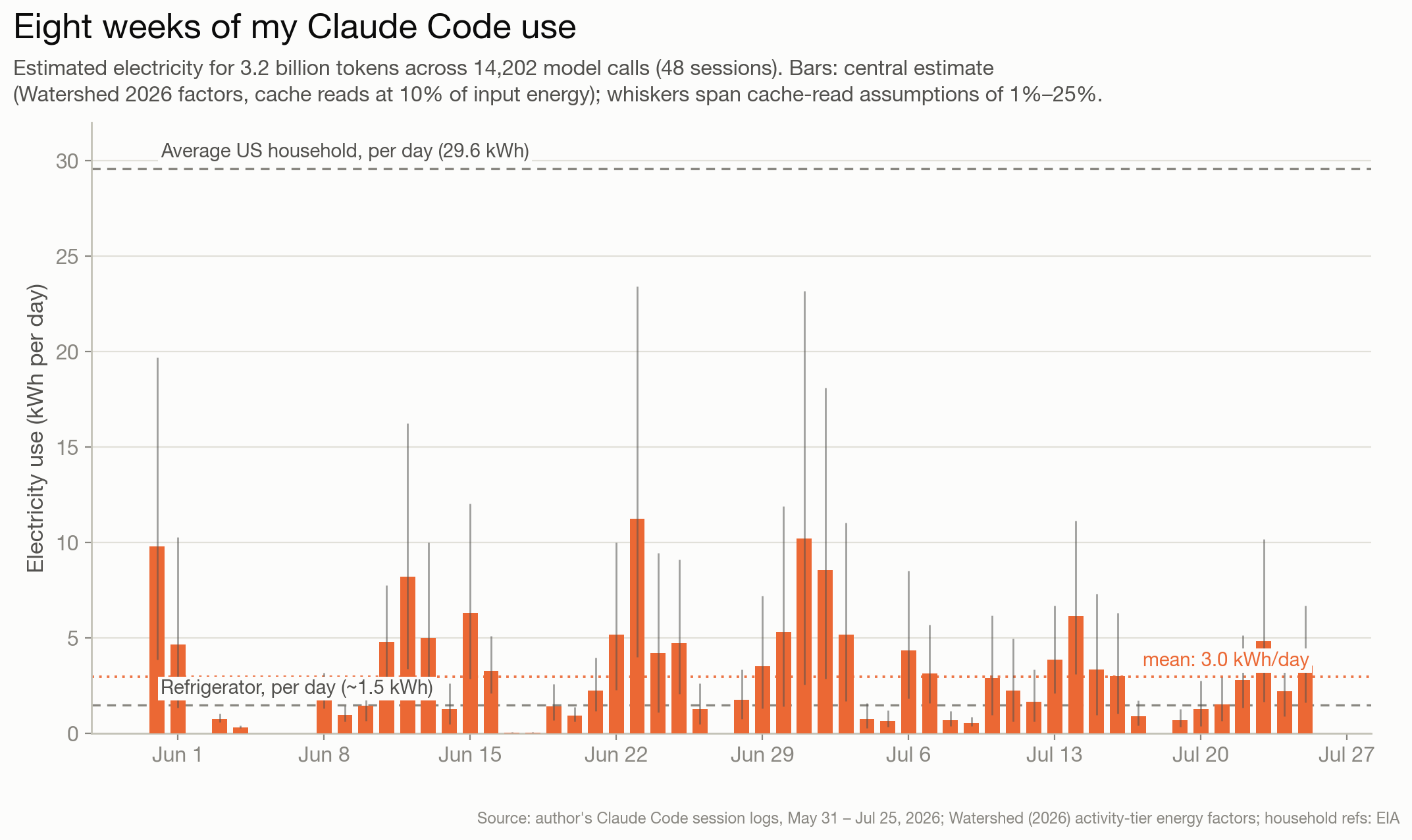
Your electricity bill may show monthly usage, but many utilities also collect daily or hourly data. This data can reveal when your home uses the most power. It can also show the effect of heating, cooling, laundry, cooking, and electric vehicle charging.
The average home uses different amounts based on size, weather, location, and equipment. A small apartment may use far less than a large home with electric heating. Therefore, your own pattern matters more than a broad national average.
Check your utility company account
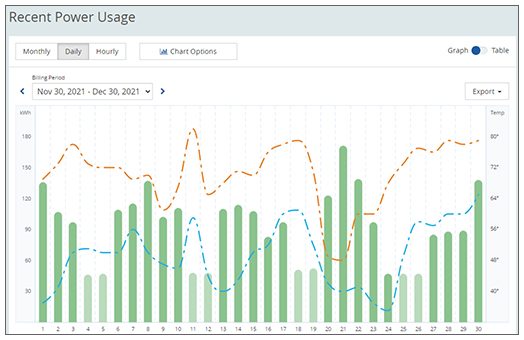
The easiest answer to how can i check my daily electricity usage is to sign in to your utility company’s website or mobile app.
Most power companies offer an online dashboard. Look for terms such as “energy usage,” “usage history,” “daily usage,” “interval data,” or “energy dashboard.”
Follow these steps:
- Visit your electricity provider’s official website or open its app.
- Sign in to your account.
- Choose the correct home or service address.
- Open the billing, usage, or energy section.
- Change the view from monthly to daily.
- Select a date range, such as the past week or past 30 days.
- Review the chart for high-use days and unusual spikes.
Some dashboards show daily kWh totals. Others show usage in 15-minute, 30-minute, or hourly blocks. Detailed interval data is useful because it helps you see exactly when electricity use rises.
For example, you may notice a large spike every evening from 5 p.m. to 9 p.m. That pattern could come from cooking, air conditioning, laundry, water heating, or electric vehicle charging.
If the data is missing, your provider may not have activated online access. You may need to request usage history or ask whether your meter sends automatic readings.
Read your electric meter manually
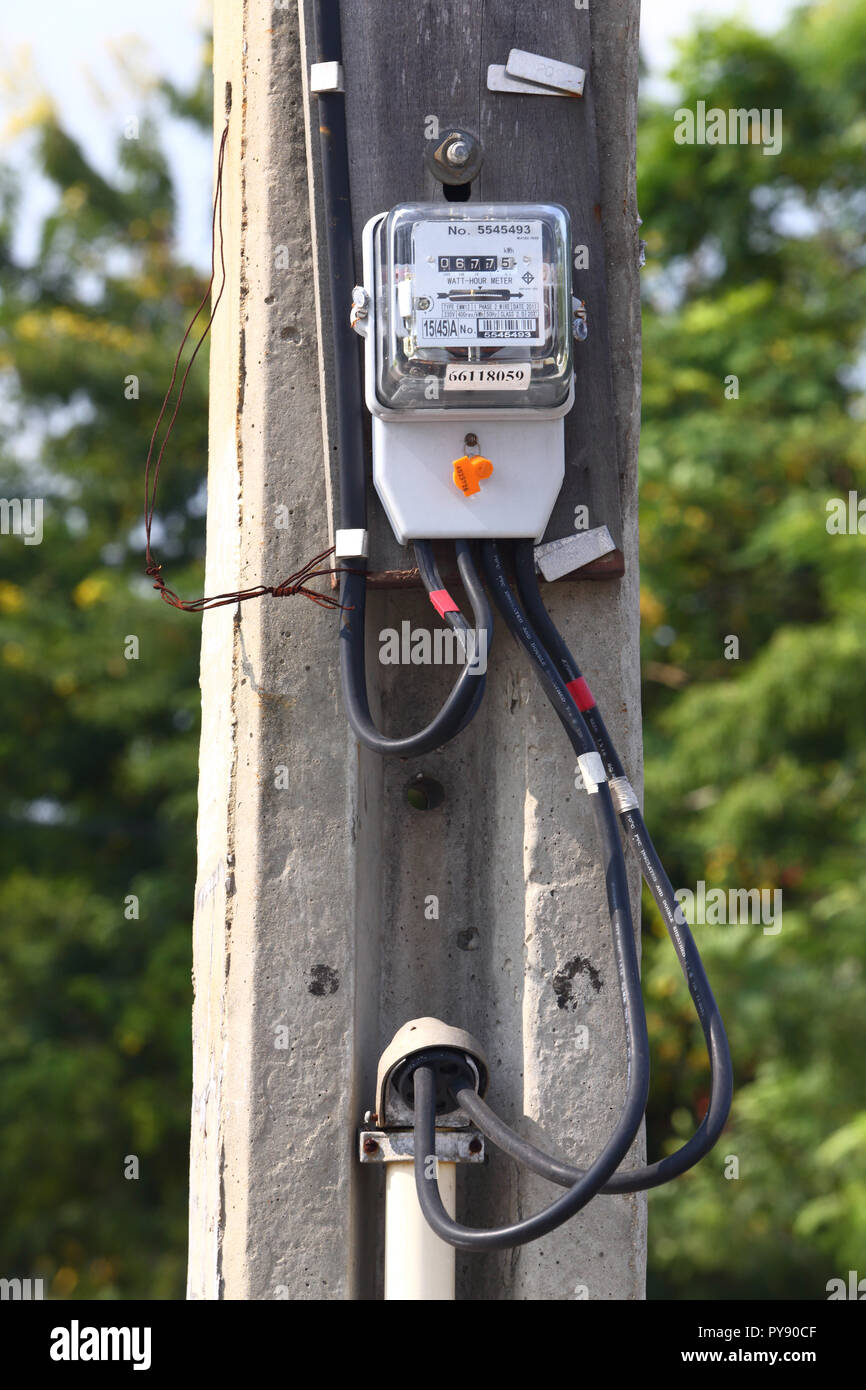
If your utility account does not show daily data, you can learn how can i check my daily electricity usage by reading the meter yourself.
First, find the meter outside your home or in a shared utility area. Never open the meter box or touch wires. Read only the numbers displayed on the meter.
Take one reading at the same time each day. Then compare it with the previous reading.
Use this formula:
Today’s meter reading − Yesterday’s meter reading = Daily electricity usage in kWh
Example:
- Monday reading: 24,580 kWh
- Tuesday reading: 24,612 kWh
- Daily usage: 32 kWh
Digital meters usually show the total energy used since installation. Some displays cycle through several numbers. Look for the reading labeled kWh.
Older meters may have a row of spinning dials. Read the dials from left to right. If a pointer sits between two numbers, record the lower number unless it has clearly passed the higher number.
Manual readings work best when you:
- Read the meter at the same time each day.
- Take a photo of the display.
- Record the reading in a notebook or spreadsheet.
- Watch for skipped days.
- Check whether the meter shows kWh or another value.
A single daily reading can be useful, but a seven-day record gives you a much clearer picture. Weather and household routines can change from one day to the next.
Use a smart meter or energy monitor
A smart meter can make how can i check my daily electricity usage much easier. It records usage at regular intervals and sends information to the utility company.
Depending on your provider, you may see:
- Daily electricity totals
- Hourly energy use
- Current electricity demand
- High-use periods
- Estimated bill amounts
- Comparisons with earlier periods
Some utilities allow customers to download usage data. A spreadsheet can help you compare weekdays, weekends, hot days, and cold days.
You can also install a home energy monitor. These devices connect near your electrical panel and track whole-home use. Some models show real-time demand through a phone app.
A monitor may tell you that your home is using 0.8 kW right now. If that level continues for three hours, the home uses about 2.4 kWh during that period.
Whole-home monitors are helpful, but they are not perfect. They estimate energy use by measuring electrical signals. Small errors may occur, especially with certain motors, dimmers, or unusual equipment.
For the most accurate billing information, use the utility meter or the final bill. Use a home monitor mainly to understand patterns and identify waste.

Check daily usage with a utility app
Many utility apps provide a quick way to check how can i check my daily electricity usage from a phone.
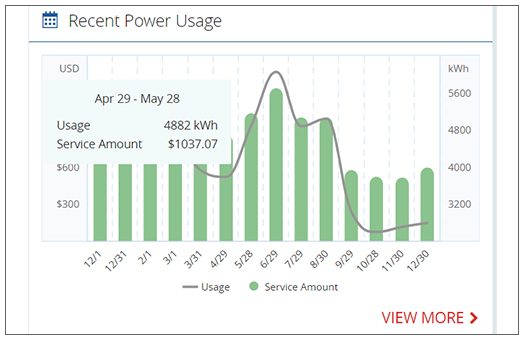
After you install the official app, look for a graph or chart. Tap a day to see the total kWh used. Some apps also show temperature data, which helps explain higher usage during heat waves or cold snaps.
A few utilities offer alerts. You may receive a message when your usage is higher than normal or when your estimated bill reaches a chosen amount.
When using an app, check these details:
- Confirm that the account matches your home.
- See whether the data is real-time, delayed, or estimated.
- Check the date and time zone.
- Look for corrections after the meter is read.
- Confirm whether solar production is included or excluded.
Daily usage data may not appear immediately. A utility could upload readings once per day, or it may take 24 to 48 hours to process the information.
Some apps show net usage. This means electricity taken from the grid minus energy sent back by solar panels. Other apps show total home consumption. These numbers are different, so read the labels carefully.

Estimate usage from appliances
You can also learn how can i check my daily electricity usage by estimating what each appliance uses.
Use this formula:
Watts × hours used ÷ 1,000 = kWh used
For example, a 1,500-watt space heater running for four hours uses:
1,500 × 4 ÷ 1,000 = 6 kWh
To estimate the cost, multiply the kWh by your electricity rate.
If your rate is 18 cents per kWh:
6 kWh × $0.18 = $1.08
Appliance estimates are useful when you want to test one device. You can estimate the use of:
- Refrigerators
- Window air conditioners
- Space heaters
- Electric water heaters
- Clothes dryers
- Washers
- Ovens
- Pool pumps
- Gaming computers
- Electric vehicle chargers
The wattage label may show the maximum power, not the average power. A refrigerator, for example, turns its compressor on and off. Its actual daily use may be lower than a simple full-power estimate.
A plug-in energy meter can give a more realistic result for smaller devices. Plug the meter into a wall outlet, connect the appliance, and record the kWh over 24 hours. Do not use a small plug-in meter for large appliances unless the device is specifically rated for that purpose.
Compare weekday and weekend electricity use
Daily electricity use often changes with your routine. Comparing different days can show where your energy goes.
Try recording usage for at least one full week. Then compare:
- Workdays and weekends
- Days at home and days away
- Hot days and mild days
- Laundry days and non-laundry days
- Days with cooking and takeout days
- Days with electric vehicle charging
For example, a household may use 22 kWh on a workday but 38 kWh on a weekend. The difference may come from longer cooking times, more laundry, television use, or extra air conditioning.
When I review energy records, I find that people often blame lights first. In many homes, heating, cooling, water heating, and dryers use much more energy than standard LED lights.
Look for a repeated pattern rather than one unusual day. A birthday party, storm, houseguest, or very hot afternoon can create a temporary spike.
Find what causes high daily usage
Once you know how can i check my daily electricity usage, the next step is finding the cause of high use.
Heating and cooling are often major contributors. An old air conditioner may run for long periods during hot weather. Electric resistance heaters can also use a large amount of power.
Water heating is another common source. Long showers, a large household, or a faulty thermostat can increase daily use. A water heater that runs often may also point to a plumbing leak.
Other common causes include:
- A clothes dryer used several times per week
- A pool pump with a long schedule
- A second refrigerator
- An older freezer
- Space heaters
- Electric vehicle charging
- Heated floors
- Aquarium heaters
- Well pumps
- Outdoor lighting
Turn off one suspected device for a short test when it is safe to do so. Compare the daily usage before and after the change. Do not shut off essential medical equipment, refrigeration, pumps, or safety systems.
You can also check your home’s base load. Turn off lights and as many appliances as practical, then observe the meter or monitor. A high overnight load may come from a water heater, HVAC system, pump, freezer, or device left in standby mode.

Use daily electricity data to lower your bill
Checking daily electricity usage is valuable because it turns an unclear bill into a simple pattern. Once you find the largest uses, focus on changes that are safe and realistic.
Try these steps:
- Set the thermostat a few degrees higher in summer and lower in winter.
- Clean or replace HVAC filters as recommended.
- Run full loads in the washer and dishwasher.
- Use a clothesline or air-dry setting when practical.
- Set a water heater to a safe, efficient temperature recommended by the manufacturer.
- Unplug rarely used electronics or use a smart power strip.
- Use LED bulbs.
- Seal drafts around doors and windows.
- Schedule pool pumps for fewer hours when safe.
- Charge an electric vehicle during lower-rate periods if your plan supports time-based pricing.
Do not assume every low-rate period is the same. Review your electricity plan before shifting major loads. Some plans have peak prices, fixed rates, demand charges, or seasonal pricing.
Energy savings should not create safety risks. Never block air vents, overload outlets, modify electrical wiring, or use damaged cords. Contact a licensed electrician for wiring concerns or repeated breaker trips.
Understand solar panels and net usage
Solar customers may see more than one electricity number. Your home can produce electricity, use electricity, export electricity, and import electricity during the same day.
For example, solar panels may produce power during the afternoon. Your home may use some of that energy, while extra power goes to the grid. At night, the home may draw power from the grid.
When checking how can i check my daily electricity usage with solar, look for these terms:
- Solar production: Energy generated by the panels
- Home consumption: Energy used by the home
- Grid import: Energy purchased from the utility
- Grid export: Energy sent to the grid
- Net usage: Imports minus exports
A utility bill may show only net usage. A solar inverter app may show total solar production. These numbers should not be compared without checking what each one measures.
Battery systems add another layer. A battery can charge from solar or the grid and discharge later. For a complete view, compare your utility data with your solar and battery app.
If the numbers seem far apart, check the date range, meter settings, and data delay. Your solar installer or utility can explain the system’s reporting method.
Avoid common electricity tracking mistakes
People often get confused when they compare a bill with an app or meter. Most problems come from timing, units, or incomplete records.
Avoid these mistakes:
- Comparing a 30-day bill with a 31-day usage chart
- Confusing watts with kilowatt-hours
- Treating estimated readings as final readings
- Forgetting energy used by heating or cooling
- Reading an analog meter backward
- Comparing net solar use with total home consumption
- Assuming one high-use day represents the whole month
- Using an incorrect electricity rate
- Ignoring delivery fees and fixed charges on the bill
Your electricity cost is not always equal to daily kWh multiplied by the supply rate. Bills may include delivery charges, taxes, service fees, and other adjustments.
A useful method is to track both usage and cost. Record the daily kWh, the weather, and major activities. After two or three weeks, you should see which actions affect your home’s energy use.
A simple seven-day tracking plan
If you are unsure how can i check my daily electricity usage, start with this simple plan.
Day one:
- Record the meter reading.
- Note the temperature.
- Write down major activities, such as laundry or charging.
Days two through six:
- Record the reading at the same time.
- Check the utility app if available.
- Note unusual events or long appliance use.
Day seven:
- Record the final reading.
- Subtract the first reading from the final reading.
- Divide the total by the number of days.
- Compare the average with each individual day.
Example:
- Starting reading: 18,400 kWh
- Ending reading: 18,610 kWh
- Total use: 210 kWh
- Tracking period: 7 days
- Average daily use: 30 kWh
This plan is simple, but it can reveal useful trends. You may discover that weekends use more power or that your daily use rises sharply during extreme weather.
Frequently Asked Questions About How Can I Check My Daily Electricity Usage
How can i check my daily electricity usage without a smart meter?
Read your electric meter at the same time each day and subtract the previous reading from the current reading. You can also estimate use with appliance wattage and a plug-in energy meter.
Can I check daily electricity usage on my electric bill?
Some bills show daily averages or a small usage graph, but many show only total monthly kWh. For exact daily data, check your utility account or ask the provider for interval usage records.
How accurate are utility electricity usage apps?
Utility apps are usually reliable for recorded meter data, but the information may be delayed or estimated. Check the app’s labels to see whether the data is real-time, preliminary, or final.
What is a normal amount of electricity to use in one day?
There is no single normal amount because home size, weather, appliances, and heating systems vary. A small apartment may use much less than a large home with electric heating or air conditioning.
How can i check my daily electricity usage with solar panels?
Review your utility account for grid imports and exports, then check your solar inverter app for production and home consumption. Make sure you compare the same dates and understand whether each figure shows net or total energy.
Why did my daily electricity usage suddenly increase?
Common causes include extreme weather, longer HVAC run time, electric heating, water heating, laundry, guests, or electric vehicle charging. Compare the high-use day with temperature data and your household activities.
Can I check how much electricity one appliance uses?
Yes. Use a plug-in energy meter for smaller devices or calculate estimated use with the formula watts multiplied by hours divided by 1,000. Large appliances may need a professional measurement or whole-home monitor.
Conclusion
Learning how can i check my daily electricity usage gives you a clear view of where your money goes. Start with your utility website or app, use manual meter readings when needed, and add an energy monitor or appliance meter for deeper detail.
Track your usage for at least seven days and note weather, routines, and major appliances. Focus your savings efforts on heating, cooling, water heating, dryers, pumps, and other high-use equipment rather than guessing.
Begin with one meter reading today, compare it tomorrow, and keep building your energy knowledge. Explore your utility’s energy tools, review your electricity plan, and share your tracking experience in the comments.
2 Comments